
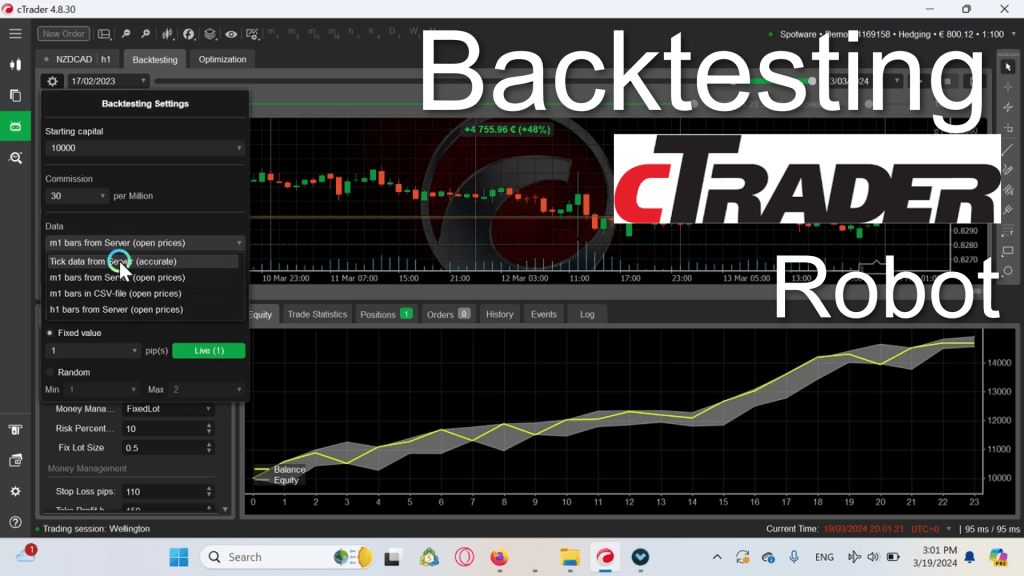
Backtesting a cBot (automated trading strategy) in cAlgo, which is part of the cTrader platform, allows you to assess the performance of your trading strategy using historical data. Here’s a step-by-step guide on how to backtest a cBot in cAlgo:
- Open cAlgo: Launch the cAlgo platform from within cTrader. If you haven’t installed it yet, you can download and install it from the cTrader platform.
- Create or Load a cBot: You can either create your own cBot using the cAlgo editor or load an existing one from your local directory or online resources.
- Select Symbol and Timeframe: Choose the symbol (currency pair, commodity, etc.) and timeframe for which you want to backtest your cBot. This should be done in the cAlgo platform.
- Open the Strategy Tester: Navigate to the ‘Strategy Tester’ tab in cAlgo. This is where you can perform backtests on your cBot.
- Select Your cBot: From the Strategy Tester window, select the cBot you want to backtest from the dropdown menu. If you haven’t already added your cBot to the cAlgo platform, you need to do so before proceeding.
- Set Testing Parameters: Configure the testing parameters such as start date, end date, initial deposit, leverage, spread, and any other relevant settings. These settings will determine the conditions under which the backtest will run.
- Run the Backtest: Once you’ve configured the testing parameters, click on the ‘Start’ or ‘Run’ button to initiate the backtest. cAlgo will then simulate the performance of your cBot based on historical data within the specified time range.
- Monitor the Backtest: During the backtest, you can monitor various metrics such as equity curve, drawdown, profit and loss, number of trades, etc. These metrics will provide insights into the performance of your cBot under different market conditions.
- Analyze the Results: Once the backtest is complete, review the results to assess the effectiveness of your cBot. Pay attention to key performance metrics such as profitability, risk-adjusted returns, win rate, and maximum drawdown.
- Optimize and Refine: Based on the results of the backtest, you may need to optimize and refine your cBot to improve its performance. This may involve adjusting parameters, adding filters, or refining entry and exit conditions.
- Repeat the Process: Backtesting is an iterative process, so it’s essential to repeat the steps above multiple times with different settings and time periods to validate the robustness of your cBot across various market conditions.
- Forward Testing and Live Trading: After thoroughly backtesting your cBot and ensuring its effectiveness, you can proceed to forward testing (testing in real-time on historical data) and eventually live trading with real money. However, always exercise caution and risk management when transitioning to live trading.


 AlgoZone
Leave a comment